Before you start learning HTML, CSS, JavaScript, React, or any other web development technology, it is important to understand one thing first: how does the Internet and Web actually work?
When you open a website in your browser, it may look simple. You type a URL, press Enter, and a webpage appears. But behind that simple action, many different technologies work together.
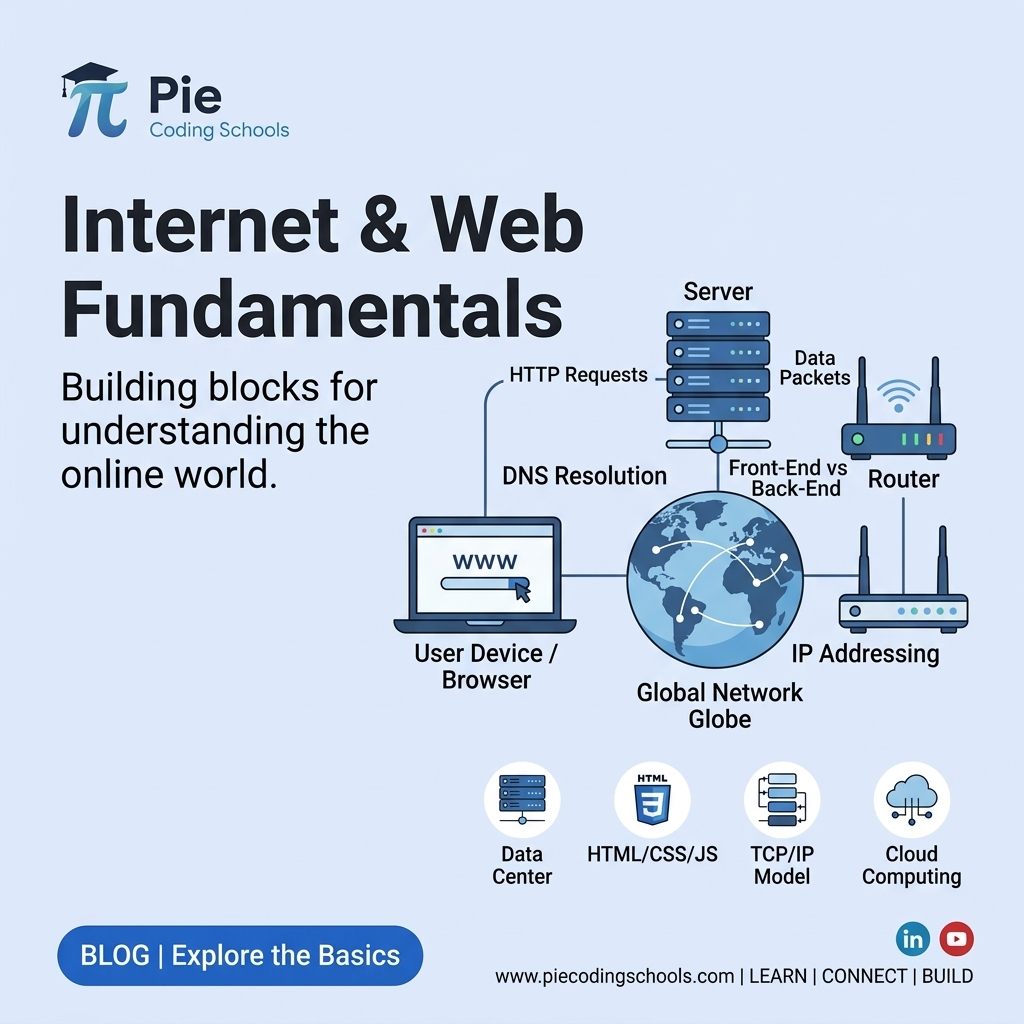
Your browser communicates with servers through the Internet, DNS finds the server's IP address, HTTP or HTTPS is used to exchange information, and the browser processes the response to display the webpage.
In this guide, we will understand the fundamental concepts of the Internet and Web and connect them together into one simple flow.
1. What Is the Internet?
The Internet is a worldwide network of connected computers and devices that communicate with each other.
Your laptop, smartphone, web servers, databases, routers, and many other devices can communicate through this network.
For example, when you open a website, your device sends a request through the Internet to a server. The server processes the request and sends information back to your device.
A simple way to think about it is:
Your Device
      ↓
    Router
      ↓
     ISP
      ↓
   Internet
      ↓
    Server
The Internet is the underlying network that allows these devices to communicate.
2. How Does the Internet Work?
The Internet works by allowing devices to exchange data using a collection of networking technologies and protocols.
When you access a website, your request travels through multiple networks and devices before reaching the destination server.
For example:
Browser
   ↓
Router
   ↓
ISP
   ↓
Internet
   ↓
Web Server
   ↓
Response
   ↓
Your Browser
The data exchanged over the Internet is broken into smaller pieces called packets. These packets travel across networks and are reassembled at the destination.
You do not need to understand every networking detail to start web development. At this stage, the important idea is that the Internet provides the network through which devices communicate.
3. Client and Server
Two important concepts in web development are client and server.
A client is a device or application that requests a service or resource.
A server is a computer or system that receives requests and provides resources or services.
Your web browser is an example of a client.
A web server may receive your request and return HTML, CSS, JavaScript, images, or data.
The basic communication looks like this:
Client
  │
  │ Request
  ↓
Server
  │
  │ Response
  ↓
Client
For example, when you visit a website, your browser sends a request to the website's server. The server processes the request and sends a response back.
4. What Is an IP Address?
Every device communicating over a network needs an address so that data can be sent to the correct destination.
This address is called an IP address.
An IP address identifies a device or network interface on a network.
For example, an IPv4 address may look like:
142.250.183.14Humans do not want to remember numbers like this for every website. That is why we use domain names.
Instead of remembering an IP address, you can type:
google.comDNS helps translate the domain name into the IP address associated with the service.
5. What Is a Domain Name?
A domain name is a human-readable name used to access a website or online service.
Examples include:
- google.com
- github.com
- piecodingschools.com
Without domain names, users would generally need to remember IP addresses to access websites.
The relationship can be simplified as:
Domain Name
      ↓
      DNS
      ↓
 IP Address
      ↓
    Server
A domain name is therefore easier for humans to remember, while computers use network addressing to communicate.
6. What Is DNS?
DNS stands for Domain Name System.
DNS translates domain names into IP addresses so that clients can locate the appropriate server.
For example, when you enter:
example.comYour browser needs to find where that domain is hosted. DNS helps find the IP address associated with the domain.
A simplified DNS flow looks like this:
Browser
   ↓
DNS Resolver
   ↓
DNS System
   ↓
IP Address
   ↓
Server
You can think of DNS like the Internet's address lookup system. Instead of remembering the numerical address of a server, you use a domain name.
7. What Is Web Hosting?
A website needs a place where its files and application can run. This is where web hosting comes in.
Web hosting provides computing resources and infrastructure that allow websites and web applications to be available over the Internet.
A hosted website may contain:
- HTML files
- CSS files
- JavaScript files
- Images
- Application code
- Databases
For example, when you deploy a website to a hosting provider, your application becomes accessible through the Internet.
A simplified relationship is:
Domain
  ↓
DNS
  ↓
Hosting / Server
  ↓
Website Application
  ↓
Webpage
Domain and hosting are different things. The domain is the human-readable address, while hosting provides the infrastructure where the website or application runs.
8. What Is HTTP?
HTTP stands for Hypertext Transfer Protocol.
HTTP is a protocol used for communication between clients and servers on the Web.
When your browser requests a webpage, it sends an HTTP request to a server.
The server then sends an HTTP response.
Browser
   │
   │ HTTP Request
   ↓
Server
   │
   │ HTTP Response
   ↓
Browser
An HTTP request can contain information such as the requested URL, HTTP method, headers, and sometimes a request body.
An HTTP response can contain a status code, headers, and response data.
Common HTTP methods include:
- GET — Retrieve data
- POST — Send or create data
- PUT — Update data
- PATCH — Partially update data
- DELETE — Delete data
Common HTTP status codes include:
- 200 — OK
- 201 — Created
- 400 — Bad Request
- 401 — Unauthorized
- 403 — Forbidden
- 404 — Not Found
- 500 — Internal Server Error
9. What Is HTTPS?
HTTPS stands for Hypertext Transfer Protocol Secure.
HTTPS uses HTTP together with encryption provided through TLS to protect communication between the client and server.
When you see:
https://example.comthe connection is using HTTPS.
HTTPS helps protect data while it travels between your browser and the server. This is especially important when applications handle information such as login credentials, personal information, or payment-related data.
Modern websites commonly use HTTPS instead of plain HTTP.
10. What Happens When You Enter a URL?
Now let's connect everything together.
Suppose you enter:
https://example.comWhat happens after you press Enter?
Step 1: The Browser Reads the URL
Your browser identifies information such as the protocol, domain, and requested resource from the URL.
Step 2: DNS Finds the IP Address
The browser or operating system uses DNS to find the IP address associated with the domain.
example.com
     ↓
    DNS
     ↓
IP Address
Step 3: The Browser Connects to the Server
The browser establishes the required network connection to communicate with the server. For HTTPS connections, TLS is also used to establish a secure connection.
Step 4: The Browser Sends an HTTP Request
The browser sends a request asking the server for the required resource.
GET / HTTP/...Step 5: The Server Processes the Request
The server receives the request and determines what response should be returned.
Depending on the application, this may involve application code, databases, authentication, APIs, or other services.
Step 6: The Server Sends a Response
The server sends an HTTP response back to the browser.
Server
   ↓
HTTP Response
   ↓
Browser
Step 7: The Browser Processes the Response
The response may contain HTML and references to other resources such as CSS, JavaScript, images, fonts, and other files.
Step 8: The Browser Builds the Webpage
The browser processes these resources and renders the page on your screen.
The simplified flow is:
Enter URL
    ↓
   DNS
    ↓
IP Address
    ↓
Server Connection
    ↓
HTTP/HTTPS Request
    ↓
Server Processing
    ↓
HTTP Response
    ↓
HTML / CSS / JavaScript
    ↓
Browser Rendering
    ↓
Web Page
11. How Does a Web Browser Work?
A web browser is software that allows users to access and interact with websites and web applications.
Popular browsers include Chrome, Firefox, Safari, and Edge.
At a high level, the browser performs several important tasks.
- Accepts the URL from the user
- Communicates with servers
- Downloads web resources
- Processes HTML
- Processes CSS
- Executes JavaScript
- Builds the DOM
- Calculates layout and styles
- Renders the webpage
A simplified browser flow looks like this:
URL
 ↓
Network Request
 ↓
HTML
 ↓
DOM
 ↓
CSS
 ↓
Styles / Layout
 ↓
JavaScript
 ↓
Rendering
 ↓
Pixels on Screen
This is why HTML, CSS, and JavaScript are the core technologies of frontend web development.
Putting Everything Together
Let's connect the complete journey in one diagram.
User
  ↓
Web Browser
  ↓
URL / Domain
  ↓
DNS
  ↓
IP Address
  ↓
Internet
  ↓
Web Server / Hosting
  ↓
HTTP / HTTPS Request
  ↓
Application Processing
  ↓
HTTP / HTTPS Response
  ↓
HTML + CSS + JavaScript
  ↓
Browser Rendering
  ↓
Web Page
Once you understand this flow, many web development concepts become easier to understand.
Internet vs Web
The Internet and the Web are related, but they are not exactly the same thing.
The Internet is the global network infrastructure that connects computers and devices.
The Web is a service that operates over the Internet and allows users to access websites and web applications through technologies such as HTTP, URLs, HTML, CSS, and JavaScript.
In simple terms:
Internet = Network Infrastructure

Web = A Service That Runs Over The Internet
Why Should a Web Developer Learn These Fundamentals?
You do not need to become a networking engineer before learning frontend development.
However, understanding these fundamentals helps you understand what is happening behind your code.
For example, when you write:
fetch("https://api.example.com/users")you are not simply calling a function. Your application is communicating with another server over the network using web protocols.
Similarly, when you deploy a Next.js or React application, concepts such as domains, DNS, hosting, servers, HTTPS, and HTTP become important.
These fundamentals provide the foundation for understanding frontend, backend, APIs, cloud deployment, and full-stack development.
Key Takeaways
- The Internet is a global network of connected devices.
- Clients send requests and servers provide responses.
- IP addresses identify devices or network interfaces.
- Domain names provide human-readable addresses.
- DNS helps translate domain names into IP addresses.
- Web hosting provides infrastructure for websites and applications.
- HTTP is a protocol used for communication between clients and servers.
- HTTPS adds TLS-based security to HTTP communication.
- Browsers request, process, and render web resources.
- HTML, CSS, and JavaScript work together to create webpages and web applications.
What Should You Learn Next?
Now that you understand the fundamentals of the Internet and Web, you can start learning the technologies used to build websites.
Internet & Web Fundamentals
          ↓
         HTML
          ↓
          CSS
          ↓
     JavaScript
          ↓
    DOM & Browser APIs
          ↓
         React
          ↓
     TypeScript
          ↓
       Next.js
Start with HTML and learn how webpages are structured. Then move to CSS for styling and JavaScript for behavior and interactivity.
Final Thoughts
Web development becomes much easier when you understand the bigger picture.
You don't need to memorize every networking protocol or browser implementation detail. First, understand the basic journey:
Browser → DNS → Server → HTTP/HTTPS → Response → Browser → WebpageOnce this mental model is clear, you can start learning HTML, CSS, JavaScript, React, backend development, APIs, databases, and cloud deployment with a much stronger foundation.
About Pie Coding Schools
At Pie Coding Schools, we believe programming is best learned by understanding fundamentals and building real projects.
Our learning approach focuses on practical development, industry-relevant technologies, real projects, and skills that help students move from learning concepts to building software.
Build Real Products. Launch Your Tech Career. 🚀